📌 What Is the OSI Model?
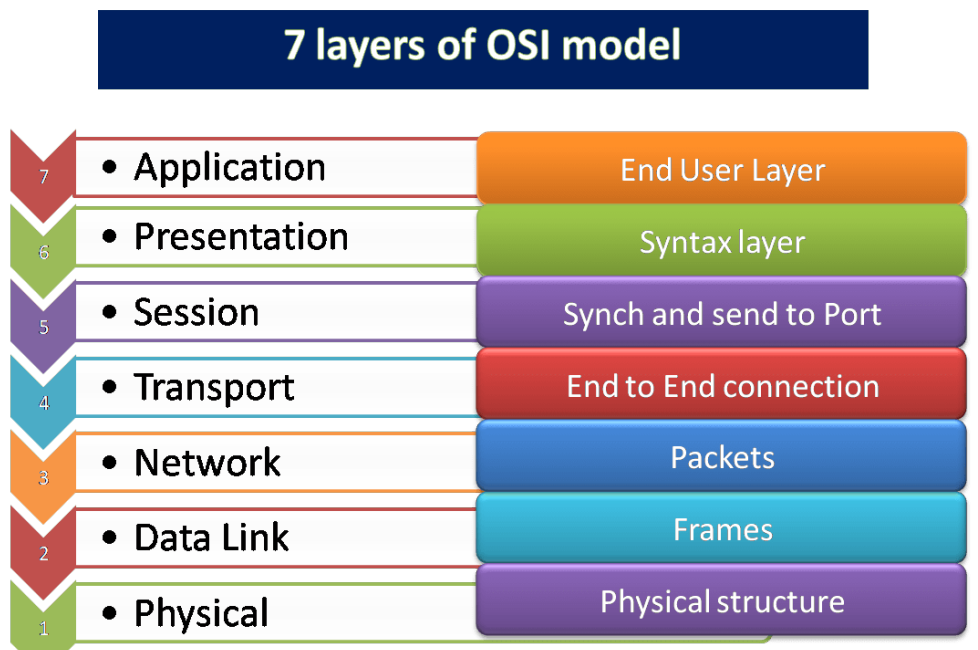
The OSI model is a conceptual framework that breaks down network communication into seven distinct layers, each responsible for a specific function. Think of it like sending a letter:
-
Layer 7 (Application) – Writing the letter
-
Layer 6 (Presentation) – Translating the language
-
Layer 5 (Session) – Making the call and staying connected
-
Layer 4 (Transport) – Breaking the letter into envelopes
-
Layer 3 (Network) – Adding the correct address
-
Layer 2 (Data Link) – Handing it to the local postman
-
Layer 1 (Physical) – The physical delivery via truck or plane
🧩 The 7 Layers of the OSI Model (Explained with Examples)
Layer 7: Application Layer – The User Interface
Role:
The Application Layer is where you interact directly with network services and applications.
Common Protocols:
Real-World Analogy:
Using a food delivery app. You see menus, place orders, and track delivery—all on the application interface.
Layer 6: Presentation Layer – The Translator
Role:
This layer ensures the data is presented in a readable and understandable format. It handles encryption, compression, and encoding.
Examples:
-
SSL/TLS – Encrypts web traffic
-
JPEG/MPEG – Formats multimedia
-
ASCII/Unicode – Encodes characters
Real-World Analogy:
Translating a document from French to English before reading it.
Layer 5: Session Layer – The Conversation Manager
Role:
Manages and maintains sessions between devices. It starts, maintains, and terminates network sessions.
Examples:
Real-World Analogy:
Like staying on a phone call until you hang up—ensuring an ongoing connection.
Layer 4: Transport Layer – The Delivery Guarantor
Role:
Breaks data into smaller pieces (segments), ensures proper delivery, and handles error checking.
Protocols:
-
TCP – Reliable, ordered, and error-checked delivery
-
UDP – Fast, connectionless delivery
Real-World Analogy:
Sending a package with tracking (TCP) vs. tossing a message in a bottle (UDP).
Layer 3: Network Layer – The Data Router
Role:
Determines the best logical path (route) using IP addresses and handles packet forwarding.
Key Elements:
Real-World Analogy:
Like a GPS helping your mail take the best route.
Layer 2: Data Link Layer – The Frame Wrapper
Role:
Prepares data for transmission on the physical network and uses MAC addresses for local delivery.
Components:
Real-World Analogy:
A local post office worker making sure your letter goes to the right house.
Layer 1: Physical Layer – The Hardware Path
Role:
Transmits raw bits (0s and 1s) via cables, fiber optics, or wireless media.
Examples:
-
Ethernet Cables (RJ45)
-
Wi-Fi / Bluetooth
-
Fiber optics
Real-World Analogy:
The actual road or cable that your letter travels on.
✅ Why Understanding the OSI Model Matters
Knowing how the OSI Model works helps in:
-
Troubleshooting issues: For example, if a website fails to load, check Layer 7 (application) or Layer 1 (physical cable).
-
Improving network security: Implement firewalls (Layer 3) or SSL encryption (Layer 6).
-
Designing robust networks: Ensures all hardware and software can communicate efficiently.
🧠 Final Thoughts
The OSI Model simplifies complex networking processes into manageable layers. By understanding the OSI model, you can diagnose issues faster, improve system performance, and build more secure and efficient networks.
Whether you’re an IT student, network engineer, or just curious, mastering the OSI layers is a fundamental step toward becoming tech-savvy.