Jetson Orin Nano Developer Kit: Complete Beginner Guide (Features, Setup, AI Projects & Price)
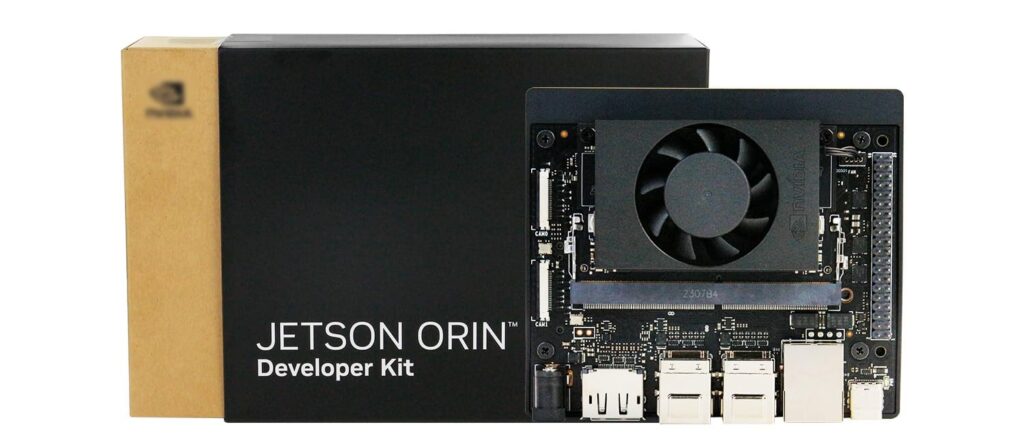
NVIDIA – the company behind the Jetson family — makes the Jetson Orin Nano Developer Kit, a compact, energy-efficient AI computer built for on-device machine learning, robotics, and computer vision.
Why this guide?
If you’re a student, hobbyist, or early-stage AI developer, the Jetson Orin Nano Developer Kit gives you real-world AI performance in a tiny package. This guide explains what it is, which projects to try, how to set it up step-by-step, and whether it’s worth buying in India.
Quick overview
Great for: On-device inference, robotics, smart cameras, edge AI prototypes.
Not for: General desktop/gaming replacement.
Comparison baseline: Raspberry Pi Foundation boards are cheaper but far less capable for ML workloads.
Estimated India price: ₹35,000–₹45,000 (varies).
Beginner setup time: ~30–60 minutes to flash OS + basic configuration.
What is the Jetson Orin Nano Developer Kit?
The Jetson Orin Nano Developer Kit is a purpose-built development board optimized for AI. It combines an Arm CPU with an NVIDIA GPU and specialized AI acceleration to run neural networks efficiently at the edge — no cloud needed. That makes it ideal for robotics, smart cameras, drones, and any low-latency AI task.
Key specifications
| Feature | Details |
|---|---|
| AI Performance | Up to 40 TOPS |
| CPU | 6-core Arm Cortex-A78AE |
| GPU | NVIDIA Ampere architecture |
| Memory | 8GB LPDDR5 |
| Storage | microSD, NVMe SSD |
| Power Range | 7W – 15W |
These specifications make it suitable for modern AI workloads such as object detection and neural networks.
Why choose Jetson Orin Nano over a Raspberry Pi?
Short answer: AI performance & ready-to-run ML stack.
Raw ML power: Jetson Orin Nano runs large models and multiple streams of vision data in real time.
Prebuilt ecosystem: NVIDIA JetPack SDK includes TensorRT, CUDA, cuDNN, and sample apps.
Robotics support: Works well with ROS (Robot Operating System) and common sensors.
Better GPU acceleration: Not just CPU bound — you get hardware-accelerated inference.
Raspberry Pi is excellent for general projects and learning Linux basics, but for production-relevant edge AI you’ll appreciate Jetson’s hardware and software stack.
Beginner-friendly setup: Step-by-step
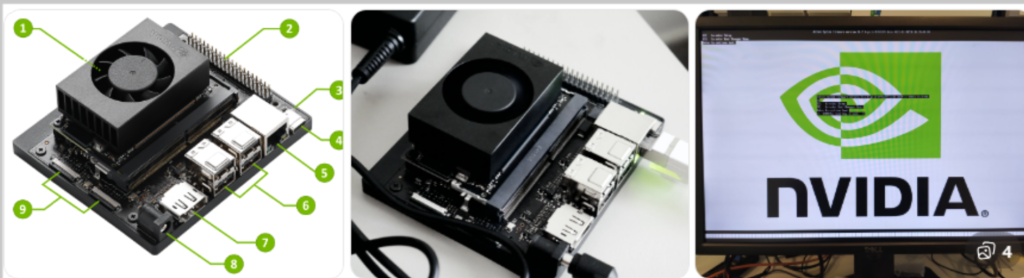
These steps assume you have the Jetson Orin Nano Developer Kit, a host PC (Windows/macOS/Linux), a microSD card or NVMe drive, a USB power source (as per kit), a monitor/keyboard, and a stable internet connection.
1. Download NVIDIA JetPack (OS image)
Visit NVIDIA’s official Jetson download page (search for JetPack / Orin Nano image).
Download the recommended JetPack image for Orin Nano. This includes a Linux-based OS plus JetPack SDK components.
2. Flash the image
Use Balena Etcher (Windows/macOS/Linux) or
dd(Linux) to flash the JetPack image to the microSD card or NVMe.
Example (Balena Etcher): Select image → Select target (microSD) → Flash.
3. Insert and power on
Insert the microSD (or attach NVMe per kit instructions).
Connect USB peripherals (keyboard/mouse) and HDMI/DP display.
Power on the board. Watch the boot logs on the attached monitor.
4. Initial Linux setup
Follow the on-screen prompts to create a user, set time zone, and configure networking.
Update packages:
sudo apt update && sudo apt upgrade
(Exact package manager/commands depend on the JetPack image distro)
5. Enable SSH & developer tools
For headless use, enable SSH via system settings.
Install or enable developer packages: Python, pip, OpenCV, and developer tools.
6. Install JetPack SDK tools (if not preinstalled)
JetPack includes CUDA, cuDNN, TensorRT, and sample models. Follow NVIDIA’s post-install instructions to verify installations:
					nvcc --version
python3 -c "import torch; print(torch.__version__)"
7. Validate ML inference
Run a sample object detection model (provided with JetPack) to confirm GPU/acceleration:
					# Example pseudocode — actual commands are in JetPack samples
python3 object_detection_demo.py --model fasterrcnn
If the demo runs at usable frame rates, the setup is correct.
Top beginner-to-intermediate AI projects
These projects are great for learning and also give practical portfolio pieces.
1. Smart CCTV / object detection camera
Use a camera + YOLO or SSD model to detect people, vehicles, or packages. Add simple logging and alerts.
2. Autonomous robot car
Combine a camera, motor controller, and ROS for basic lane following and obstacle avoidance.
3. Face recognition access control
Use a compact face embedding model to allow/deny access with a small display and relay.
4. Retail analytics / footfall counter
Count people entering stores and generate simple analytics on-device.
5. Voice-controlled assistant
Use offline keyword spotting and small NLP models for basic commands.
6. Traffic monitoring & counting
Capture vehicle counts, classification, and speed estimation at the edge.
Each project teaches systems integration (sensors, networking, model optimization) — the real skills recruiters want.
Performance tuning & best practices
Use TensorRT for inference — converts models for faster execution on NVIDIA GPUs.
Quantize models (FP16 / INT8) to get better throughput with modest accuracy trade-offs.
Prefer NVMe if your workload writes/reads heavy data.
Thermals matter — add a heatsink/fan if operating near continuous peak load.
Power gating & profiling — measure real power draw for battery-operated robots.
Price & buying tips (India)
Estimated price range: ₹35,000–₹45,000 (developer kits vary by reseller and included accessories).
Buy from reputable distributors or verified e-commerce sellers. Check customs and local warranty.
Consider used boards for learning, but verify condition and included accessories.
Common beginner questions
Q: Is Jetson Orin Nano good for beginners?
A: Yes — especially if you already know basic Linux and want to learn applied AI, computer vision, or robotics. The JetPack SDK and community samples lower the learning curve.
Q: Can I train models on the Orin Nano?
A: It’s designed primarily for inference. Small-scale on-device training (fine-tuning) is possible, but heavy training is better on a desktop/GPU/cloud.
Q: Do I need to know CUDA?
A: Basic Python + ML knowledge is enough to start. Learning CUDA/TensorRT will help you get maximum performance.
Q: Power consumption — can I run on battery?
A: Yes — with appropriate battery packs and power management. Typical power ranges from ~7W (idle) to 15W+ (full load).
Final thoughts: is it worth it?
If your goal is real-time computer vision, robotics, or deploying ML models at the edge, the Jetson Orin Nano Developer Kit is a strong, forward-looking choice. It provides a robust software ecosystem, excellent hardware acceleration for inference, and a path from prototypes to production. For pure hobbyist tinkering where cost is the main factor, a Raspberry Pi is cheaper — but it won’t run the same ML workloads reliably.
Compare Jetson VS Raspberry Pi
| Feature | Jetson Orin Nano | Raspberry Pi |
|---|---|---|
| AI Capability | High | Limited |
| Deep Learning | Built-in GPU | External accelerators |
| Robotics | Advanced | Basic |
| Learning AI | Excellent | Entry level |
I love this article
lasix furosemide for dogs
lasix furosemide for dogs
zudena 100 mg
zudena 100 mg
doxycycline hyclate 100mg price
doxycycline hyclate 100mg price
Gave 22winbet a shot and it’s pretty solid. The variety of options is good and things seem fair. Check it out and see how you like it 22winbet!
Hey, just tried out jljl99applogin! It’s actually pretty slick, easy to navigate and everything loaded super quick. Not bad at all for a quick gaming session. Check it out! jljl99applogin
Been playing on kubetku11i for a bit now. The interface is clean and things run smoothly. No complaints from me! If you’re looking for something new, give it a try here: kubetku11i
tadalafil cialis difference
tadalafil cialis difference