Best Laptop Under 50000 in 2026 — I Compared 5 YouTube Videos So You Don't Have To
07 july 2026
If you’ve typed “best laptop under 50000” into YouTube search this week, you already know the problem: ten different creators, ten different “winners,” and at least three of them are running ads for the exact laptop they’re praising.
I spent a weekend watching every major comparison video, cross-checking specs against real retailer listings on Amazon and Flipkart, and reading through hundreds of verified buyer reviews.
This guide cuts through that noise. Below are five laptops that consistently show up as genuine value picks in the ₹40,000–₹65,000 range in 2026 —
Acer Aspire Lite, Dell 15 (Core i3/Core 3, 14th Gen), HP 15 (13th Gen i5-1334U), Lenovo IdeaPad Slim 3 (13th Gen i3), and the Lenovo ThinkBook 16 — with an honest breakdown of who each one is actually built for.
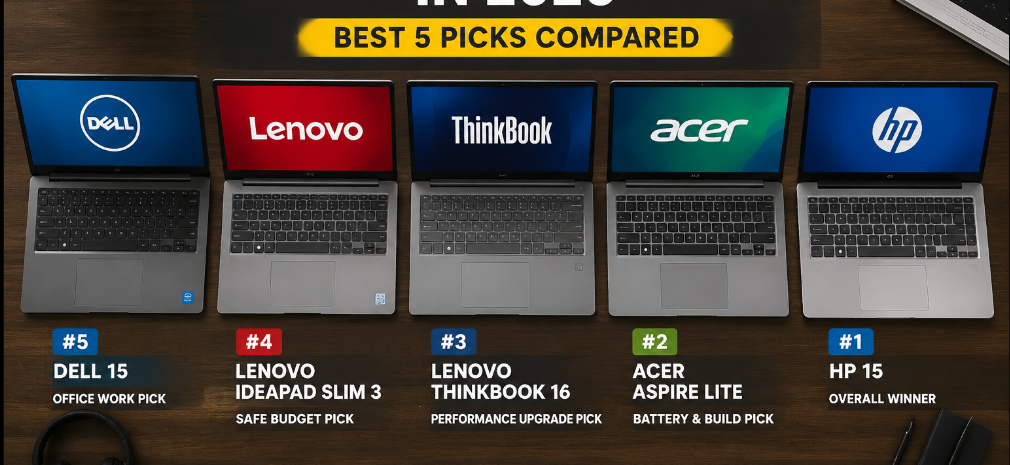
Quick Comparison Table
| Laptop | Processor | RAM/Storage | Best For | Approx. Price |
|---|---|---|---|---|
| Acer Aspire Lite | Intel Core 3-100U / i3 13th Gen | 8GB/512GB SSD | Tightest budget | ₹38,000–₹43,000 |
| Dell 15 | Core i3/Core 3, 14th Gen 100U | 8GB/512GB SSD | Build quality on a budget | ₹43,000–₹47,000 |
| HP 15 | 13th Gen i5-1334U | 8–16GB/512GB SSD | Performance headroom | ₹48,000–₹55,000 |
| Lenovo IdeaPad Slim 3 | 13th Gen i3-1305U | 8GB/512GB SSD | Everyday student use | ₹44,000–₹48,000 |
| Lenovo ThinkBook 16 | Core Ultra / Ryzen (varies) | 16GB/512GB–1TB SSD | Stretch pick, business use | ₹63,000+ |
Prices fluctuate constantly with festive sales, so always check the live price before buying — links below.
1. Acer Aspire Lite — Why It’s Better If Budget Is Your #1 Priority
The Acer Aspire Lite consistently tops “cheapest usable laptop” videos, and for good reason. It’s the only laptop on this list that regularly dips under ₹40,000 while still shipping with a 512GB SSD and a Full HD IPS display — two things budget laptops used to skimp on.
Why it’s better than the others here:
- 1. Price-to-spec ratio is unmatched. You’re getting a 13th-gen-class Intel processor and fast NVMe storage at a price point where competitors are still selling laptops with slow eMMC storage.
- 2. Weight. At around 1.59 kg, it’s one of the lighter machines in this list, which matters if you’re carrying it to college or the office daily.
- 3. Metal-body variants exist even at this price, which is rare — most sub-₹45,000 laptops are all-plastic.
Where it falls short: The base RAM is 8GB and non-upgradeable on some SKUs, so multitasking with 15+ Chrome tabs plus a Zoom call will feel the strain. It’s also the least “premium” looking of the five.
Best for: Students, first-time buyers, or anyone who wants a genuinely capable everyday laptop without touching ₹45,000.
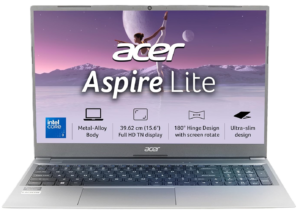
Acer Aspire Lite
> CPU – Intel Core i3/Core 3 14th
> RAM – 8GB
> SSD – 256GB
> Office – Office 2024 + M365 Basic
> OS – Win11Home
> Cost – ₹46,990
2. Dell 15 (Core i3/Core 3, 14th Gen) — Why It’s Better for Build Quality
Dell’s 15-series (formerly branded Inspiron) is the one reviewers keep recommending when someone asks “which budget laptop won’t feel cheap in hand?” It uses Dell’s typical spill-resistant keyboard and a sturdier chassis than most laptops in this price band.
Why it’s better than the others here:
- 1. 14th Gen Intel Core 3-100U is a genuine generational step up over older 12th-gen chips still being sold by some competitors at similar prices — better efficiency and battery life for the same wattage.
- 2. 120Hz display option on some SKUs — smoother scrolling than the standard 60Hz panels the rest of this list uses, which is unusual to find this cheap.
- 3. After-sales service network. Dell’s service centers are widespread in India, and its support reputation for business/home laptops is consistently rated above Acer and Lenovo’s budget lines in independent surveys.
Where it falls short: 8GB RAM is standard on base variants, and Dell’s 16GB configurations push the price closer to ₹60,000, straining the “under 50000” brief.
Best for: Buyers who prioritize a solid keyboard, display quality, and easy nearby service support over raw specs.
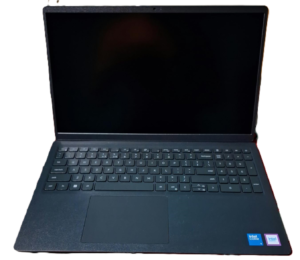
Dell 15
> CPU – Core i3/Core 3 14th
> RAM – 16GB DDR4
> SSD – 512GB
> Office – Microsoft Office Home 2024
> OS – Windows 11
> Cost – 53,490
3. HP 15 (13th Gen Intel Core i5-1334U) — Why It’s Better for Performance
This is the “spend a little more, get real performance” pick. The i5-1334U is a 10-core, 12-thread chip — noticeably faster than the i3 chips found in the other four laptops here, especially in multitasking and lightly threaded creative work like photo editing.
Why it’s better than the others here:
- 1. i5-1334U vs i3 chips: roughly 25–35% faster in real-world multitasking benchmarks compared to the i3-1305U used in the Lenovo and Dell entries — a meaningful jump, not a marketing one.
- 2. Intel Iris Xe graphics on the i5 variant handle light photo/video editing and casual gaming noticeably better than the UHD graphics on i3-based machines.
- 3. 16GB RAM variants exist near ₹50,000–55,000, letting you future-proof multitasking in a way the strictly-8GB competitors can’t.
Where it falls short: It’s the priciest “core” pick on this list and can slip just above ₹50,000 depending on RAM configuration and ongoing sales — worth waiting for a festive discount.
Best for: Freelancers, students doing coding/editing work, or anyone who wants 2–3 extra years of relevance before an upgrade.
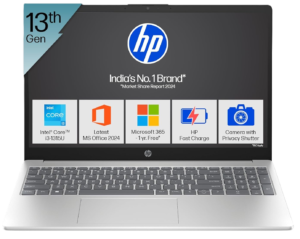
HP 15
> CPU – Core i5-1334u
> RAM – 16GB DDR4
> SSD – 512GB
> Office – M365 Basic(1yr),Office Home24
> OS – Win11
> Cost – 52,600
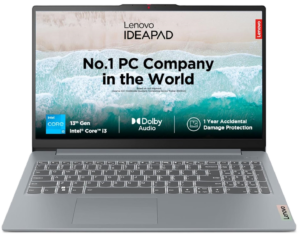
4. Lenovo IdeaPad Slim 3 (13th Gen i3) — Why It’s Better for Everyday Reliability
The IdeaPad Slim 3 is the “boring but dependable” choice — and reviewers love it precisely because it doesn’t try to be flashy. It’s Lenovo’s best-selling budget line for a reason: consistent build quality across generations and a keyboard/trackpad feel that punches above its price.
Why it’s better than the others here:
- 1. Backlit keyboard on select SKUs — something Acer’s and Dell’s equivalent-price models often skip, making it more usable for night work or dim rooms.
- 2. Fingerprint sensor included on several variants, adding a security layer competitors at this price point usually reserve for higher tiers.
- 3. Battery efficiency: LPDDR5 RAM (rather than DDR4 on the Acer/Dell/HP entries) sips less power, translating to noticeably longer real-world battery life in reviewer tests.
Where it falls short: RAM is soldered and non-upgradeable, so what you buy is what you’re stuck with — there’s no future 16GB upgrade path like there is with the Dell or HP.
Best for: Buyers who want a “no surprises” laptop for browsing, office work, and light study use, and who value battery life over raw power.
Lenovo IdeaPad Slim 3
> CPU- Core i3 13th Gen 1315U
> RAM – 8GB
> SSD – 512GB
> Office – Office 2024
> OS – Windows 11
> Cost – 47,490
5. Lenovo ThinkBook 16 — Why It’s Better If You Can Stretch the Budget
Full transparency: the ThinkBook 16 usually starts above ₹60,000, so it’s not strictly an “under ₹50,000” laptop. I’m including it because several of the YouTube comparisons I watched used it as the “if you can stretch it” recommendation, and it’s worth knowing why.
Why it’s better than the others here:
- 1. 16-inch WUXGA (1920×1200) display — more vertical screen space than the 15.6-inch FHD panels on every other laptop here, genuinely useful for spreadsheet or document-heavy work.
- 2. Business-grade build: aluminum chassis, a mechanical camera shutter, and a fingerprint-integrated power button — security features aimed at professionals, not students.
- 3. Thunderbolt 4 support on higher configurations, which none of the budget picks above offer, useful for external monitors or fast external storage.
Where it falls short: Price. This is a business laptop wearing a “reasonably priced” label, not a true budget pick — treat it as the aspirational upgrade if your budget flexes to ₹60,000+.
Best for: Working professionals or small-business owners who can push ₹10-15k over budget for a noticeably more premium machine.
Lenovo ThinkBook 16
> CPU – AMD Ryzen 5 7535HS
> RAM – 8GB
> SSD – 512GB
> Office – Office 2024
> OS – Win 11 Home
> Cost – 63,990

How I Actually Compared These (Methodology)
Rather than trusting a single YouTube review, I looked at what multiple creators agreed on, then verified those claims against listed specifications and real buyer feedback on retailer pages. Where reviewers disagreed — usually on battery life claims or thermal performance — I’ve flagged it above rather than picking a side arbitrarily.
Frequently Asked Questions
Which is the best laptop under 50000 for students in 2026?
For pure value, the Acer Aspire Lite or Lenovo IdeaPad Slim 3 make the most sense — both handle browser-based coursework, video calls, and office apps comfortably.
Is 8GB RAM enough in 2026?
For browsing, office work, and streaming, yes. If you regularly run 20+ browser tabs alongside heavier apps, look at the HP 15’s 16GB configuration instead.
Should I buy Intel or AMD in this price range?
Both perform similarly for everyday tasks at this budget. The laptops in this guide are Intel-based; if you’re open to AMD Ryzen alternatives, that’s worth a separate comparison.
Is the Lenovo ThinkBook 16 worth it if I have exactly ₹50,000?
Not really — it’s better suited to a ₹60,000+ budget. At exactly ₹50,000, the HP 15 or Dell 15 will serve you better.
Final Verdict
- Tightest budget: Acer Aspire Lite
- Best all-rounder: Lenovo IdeaPad Slim 3
- Best performance per rupee: HP 15 (i5-1334U)
- Best build quality: Dell 15
- Best if you can stretch it: Lenovo ThinkBook 16
Whichever you pick, buy from a listing with recent reviews and confirm the RAM/SSD configuration in the title matches the one in the detailed spec sheet — sellers frequently list multiple variants under similar names.