May 24, 2025
Imagine your computer network is like a high-security office building. A firewall acts as the security checkpoint at the entrance — carefully checking IDs, inspecting baggage, and deciding who can enter or exit.
Just like a business would never leave its main door unlocked, no computer network should operate without a firewall.
1. Monitors all incoming and outgoing network traffic
2. Blocks unauthorized access while allowing legitimate communication
3. Protects internal networks (trusted) from external threats (untrusted)
4. Helps prevent cyberattacks, data theft, and malware communication
In short, a firewall is your first line of digital defence.
Benefit | What It Protects Against |
Blocks Hackers | Unauthorized access |
Stops Malware | Viruses, ransomware, spyware |
Protects Data | Customer info, financial data, business records |
Controls Internet Access | Restricts unwanted apps/websites |
Monitors Traffic | Logs, alerts, and real-time monitoring |
A hospital firewall:
1. Allows access to patient records only from authorized systems
2. Blocks outsiders trying to reach confidential data
3. Prevents medical devices from talking to suspicious servers
4. Alerts IT teams when unusual activity is detected
This layered approach helps prevent ransomware and data breaches.
1. Examines basic information in data packets
2. Fast and lightweight
3. Limited intelligence
Best for: Small offices or basic home networks
1. Tracks active connections
2. Understands context (not just packet details)
3. More secure than basic filtering
Best for: Growing businesses
1. Deep packet inspection
2. Built-in antivirus & intrusion prevention
3. Identifies applications, not just ports
Best for: Enterprises, large networks, and modern cybersecurity needs
Example brands: Fortinet, Sophos, Palo Alto, Cisco Firepower
1. Specially protects websites and online applications
2. Blocks SQL injection, XSS, and bot attacks
Best for: E-commerce, SaaS and websites handling sensitive data
1. Protects cloud applications and infrastructure
2. Flexible scaling
Best for: Businesses using AWS, Azure, or Google Cloud

1. Fortinet / Sophos / WatchGuard
2. Cisco Meraki
3. Trend Micro Cloud One
1. Protection Against Cyber Threats
1. Blocks 99% of automated attacks
2. Reduces ransomware and hacking attempts
3. Prevents breaches (average cost: $4.45 million — IBM 2023)
2. Regulatory Compliance
Helps meet security standards like:
3. Productivity & Bandwidth Control
1. Blocks social media (optional)
2. Restricts high-bandwidth streaming
3. Ensures stable network performance
4. Secure Remote Work
2. Protects remote endpoints
For Small Businesses:
1. Router with built-in firewall
2. Cloud-based firewall
3. Basic intrusion prevention system
For Enterprises:
1. Dedicated firewall appliances
2. 24/7 monitoring
3. Advanced threat intelligence
4. Multi-WAN and high-availability design
|
Mistake |
Why It’s Dangerous |
|
Set-and-forget setup |
Firewall rules become outdated |
|
Too many exceptions |
Creates security holes |
|
Ignoring alerts |
Hack attempts go unnoticed |
|
No failover or backup |
One failure can shut operations |
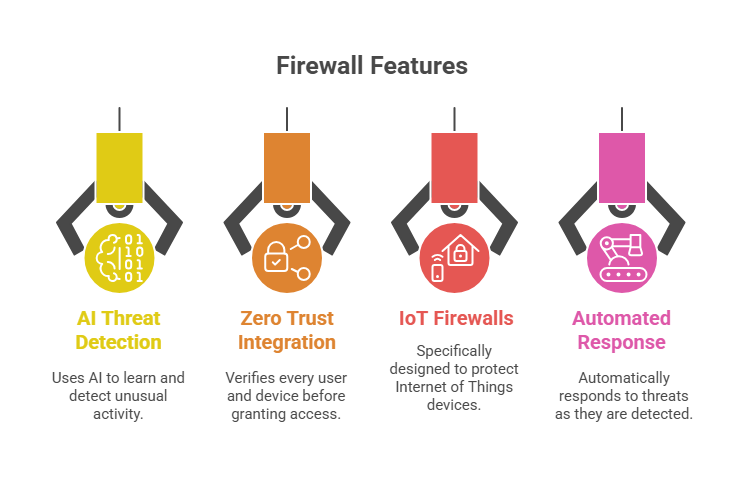
1. AI-Driven Threat Detection—learns behavior to detect anomalies
2. Zero Trust Integration—”trust nothing, verify everything”
3. IoT-aware Firewalls—protects smart devices
4. Automated Threat Response—reacts instantly to new attacks
Whether you’re:
1. A home user banking online
2. A small business storing customer data
3. An enterprise managing critical infrastructure
A firewall is essential. But it’s not just about having one — it’s about having the right firewall, properly configured and regularly maintained.