Jetson Orin Nano Developer Kit: Complete Beginner Guide (Features, Setup, AI Projects & Price)
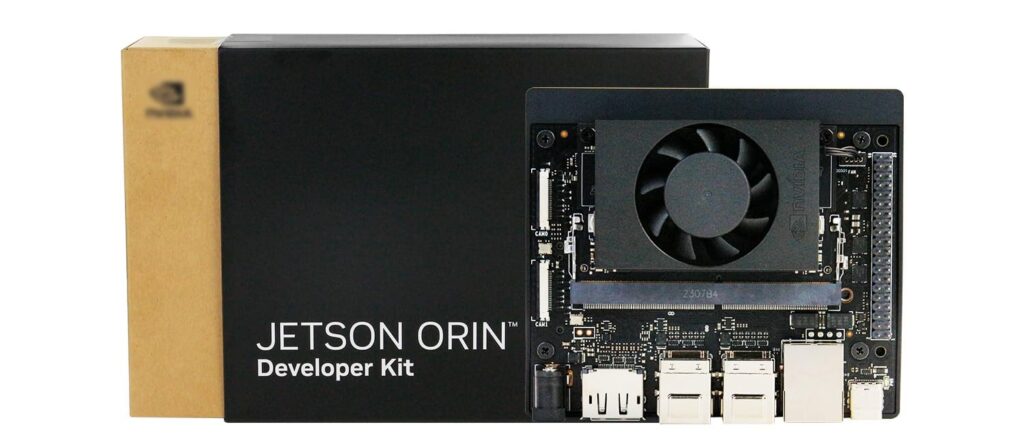
NVIDIA – the company behind the Jetson family — makes the Jetson Orin Nano Developer Kit, a compact, energy-efficient AI computer built for on-device machine learning, robotics, and computer vision.
Why this guide?
If you’re a student, hobbyist, or early-stage AI developer, the Jetson Orin Nano Developer Kit gives you real-world AI performance in a tiny package. This guide explains what it is, which projects to try, how to set it up step-by-step, and whether it’s worth buying in India.
Quick overview
Great for: On-device inference, robotics, smart cameras, edge AI prototypes.
Not for: General desktop/gaming replacement.
Comparison baseline: Raspberry Pi Foundation boards are cheaper but far less capable for ML workloads.
Estimated India price: ₹35,000–₹45,000 (varies).
Beginner setup time: ~30–60 minutes to flash OS + basic configuration.
What is the Jetson Orin Nano Developer Kit?
The Jetson Orin Nano Developer Kit is a purpose-built development board optimized for AI. It combines an Arm CPU with an NVIDIA GPU and specialized AI acceleration to run neural networks efficiently at the edge — no cloud needed. That makes it ideal for robotics, smart cameras, drones, and any low-latency AI task.
Key specifications
| Feature | Details |
|---|---|
| AI Performance | Up to 40 TOPS |
| CPU | 6-core Arm Cortex-A78AE |
| GPU | NVIDIA Ampere architecture |
| Memory | 8GB LPDDR5 |
| Storage | microSD, NVMe SSD |
| Power Range | 7W – 15W |
These specifications make it suitable for modern AI workloads such as object detection and neural networks.
Why choose Jetson Orin Nano over a Raspberry Pi?
Short answer: AI performance & ready-to-run ML stack.
Raw ML power: Jetson Orin Nano runs large models and multiple streams of vision data in real time.
Prebuilt ecosystem: NVIDIA JetPack SDK includes TensorRT, CUDA, cuDNN, and sample apps.
Robotics support: Works well with ROS (Robot Operating System) and common sensors.
Better GPU acceleration: Not just CPU bound — you get hardware-accelerated inference.
Raspberry Pi is excellent for general projects and learning Linux basics, but for production-relevant edge AI you’ll appreciate Jetson’s hardware and software stack.
Beginner-friendly setup: Step-by-step
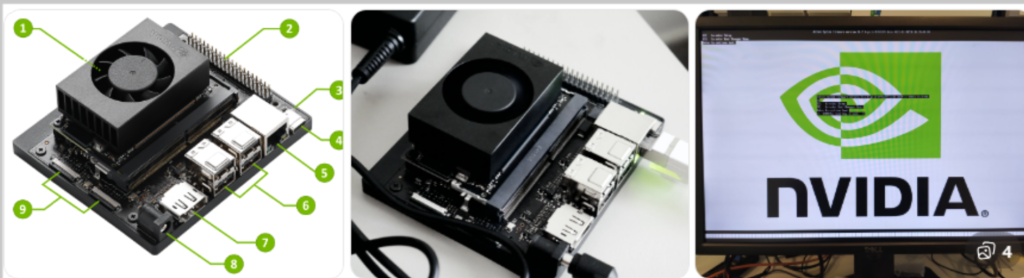
These steps assume you have the Jetson Orin Nano Developer Kit, a host PC (Windows/macOS/Linux), a microSD card or NVMe drive, a USB power source (as per kit), a monitor/keyboard, and a stable internet connection.
1. Download NVIDIA JetPack (OS image)
Visit NVIDIA’s official Jetson download page (search for JetPack / Orin Nano image).
Download the recommended JetPack image for Orin Nano. This includes a Linux-based OS plus JetPack SDK components.
2. Flash the image
Use Balena Etcher (Windows/macOS/Linux) or
dd(Linux) to flash the JetPack image to the microSD card or NVMe.
Example (Balena Etcher): Select image → Select target (microSD) → Flash.
3. Insert and power on
Insert the microSD (or attach NVMe per kit instructions).
Connect USB peripherals (keyboard/mouse) and HDMI/DP display.
Power on the board. Watch the boot logs on the attached monitor.
4. Initial Linux setup
Follow the on-screen prompts to create a user, set time zone, and configure networking.
Update packages:
sudo apt update && sudo apt upgrade
(Exact package manager/commands depend on the JetPack image distro)
5. Enable SSH & developer tools
For headless use, enable SSH via system settings.
Install or enable developer packages: Python, pip, OpenCV, and developer tools.
6. Install JetPack SDK tools (if not preinstalled)
JetPack includes CUDA, cuDNN, TensorRT, and sample models. Follow NVIDIA’s post-install instructions to verify installations:
					nvcc --version
python3 -c "import torch; print(torch.__version__)"
7. Validate ML inference
Run a sample object detection model (provided with JetPack) to confirm GPU/acceleration:
					# Example pseudocode — actual commands are in JetPack samples
python3 object_detection_demo.py --model fasterrcnn
If the demo runs at usable frame rates, the setup is correct.
Top beginner-to-intermediate AI projects
These projects are great for learning and also give practical portfolio pieces.
1. Smart CCTV / object detection camera
Use a camera + YOLO or SSD model to detect people, vehicles, or packages. Add simple logging and alerts.
2. Autonomous robot car
Combine a camera, motor controller, and ROS for basic lane following and obstacle avoidance.
3. Face recognition access control
Use a compact face embedding model to allow/deny access with a small display and relay.
4. Retail analytics / footfall counter
Count people entering stores and generate simple analytics on-device.
5. Voice-controlled assistant
Use offline keyword spotting and small NLP models for basic commands.
6. Traffic monitoring & counting
Capture vehicle counts, classification, and speed estimation at the edge.
Each project teaches systems integration (sensors, networking, model optimization) — the real skills recruiters want.
Performance tuning & best practices
Use TensorRT for inference — converts models for faster execution on NVIDIA GPUs.
Quantize models (FP16 / INT8) to get better throughput with modest accuracy trade-offs.
Prefer NVMe if your workload writes/reads heavy data.
Thermals matter — add a heatsink/fan if operating near continuous peak load.
Power gating & profiling — measure real power draw for battery-operated robots.
Price & buying tips (India)
Estimated price range: ₹35,000–₹45,000 (developer kits vary by reseller and included accessories).
Buy from reputable distributors or verified e-commerce sellers. Check customs and local warranty.
Consider used boards for learning, but verify condition and included accessories.
Common beginner questions
Q: Is Jetson Orin Nano good for beginners?
A: Yes — especially if you already know basic Linux and want to learn applied AI, computer vision, or robotics. The JetPack SDK and community samples lower the learning curve.
Q: Can I train models on the Orin Nano?
A: It’s designed primarily for inference. Small-scale on-device training (fine-tuning) is possible, but heavy training is better on a desktop/GPU/cloud.
Q: Do I need to know CUDA?
A: Basic Python + ML knowledge is enough to start. Learning CUDA/TensorRT will help you get maximum performance.
Q: Power consumption — can I run on battery?
A: Yes — with appropriate battery packs and power management. Typical power ranges from ~7W (idle) to 15W+ (full load).
Final thoughts: is it worth it?
If your goal is real-time computer vision, robotics, or deploying ML models at the edge, the Jetson Orin Nano Developer Kit is a strong, forward-looking choice. It provides a robust software ecosystem, excellent hardware acceleration for inference, and a path from prototypes to production. For pure hobbyist tinkering where cost is the main factor, a Raspberry Pi is cheaper — but it won’t run the same ML workloads reliably.
Compare Jetson VS Raspberry Pi
| Feature | Jetson Orin Nano | Raspberry Pi |
|---|---|---|
| AI Capability | High | Limited |
| Deep Learning | Built-in GPU | External accelerators |
| Robotics | Advanced | Basic |
| Learning AI | Excellent | Entry level |
I love this article