GRUB Rescue Prompt: How to Fix Boot Errors Easily (2025-26 Guide)

ubuntu, linux ubuntu, ubuntu linux, ubuntu latest version, ubuntu versions, linux server ubuntu, linux ubuntu latest version, ubuntu download, linux ubuntu download, rufus, rufus software, rufus download, rufus software download, rufus windows 10, rufus bootable usb, grub rescue, grub rescue commands, grub rescue command line, grub rescue fix, grub rescue windows 10, grub rescue windows 11, grub rescue windows 7, grub rescue ubuntu, grub rescue no such partition, grub rescue unknown filesystem, grub rescue mode, entering grub rescue mode, rescue grub, grub repair, gnu grub commands, grub commands, insmod normal no such partition, grub rescue filesystem is unknown, unknown filesystem grub rescue, grub rescue prompt fix command line, grub rescue prompt fix ubuntu, grub rescue prompt fix windows 10, grub rescue prompt fix windows 11, grub rescue prompt fix windows 7, grub rescue reboot, ubuntu grub rescue, ubuntu grub repair, ubuntu grub menu not showing, ubuntu stuck in grub command line, ubuntu grub config, ubuntu grub command line, ubuntu grub commands, how to get grub menu at boot, how to fix grub bootloader, how to fix grub problem in ubuntu, what does grub do in ubuntu, how do i get to grub in ubuntu, is grub rescue always fixable, grub boot menu, grub gnu, gnu grub,

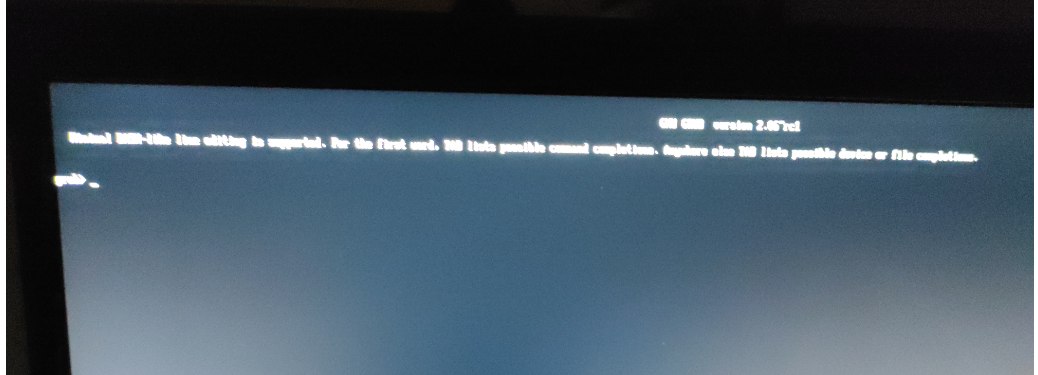
If you’ve ever started your computer and seen a black screen with the message “grub>” or “grub rescue>”, don’t panic. This message indicates that your Linux bootloader (GRUB) cannot locate the operating system or boot files.

In this complete guide, we’ll explain what the GRUB rescue prompt means, why it appears, and — most importantly — how to fix it quickly without losing data.

What Is the GRUB Rescue Prompt?

GRUB stands for GNU GRand Unified Bootloader. It’s a small program that helps your system start Linux or other operating systems installed on your computer.

When your bootloader breaks or the system can’t locate the GRUB configuration files, the GRUB rescue prompt appears.
In most cases, this message means that the GRUB configuration or boot files are missing or corrupted.

Common Message You Might See:

Minimal BASH-like line editing is supported.

For the first word, TAB lists possible command completions.

grub>

This message usually appears when the GRUB configuration or boot files are missing or corrupted.

Why Does the GRUB Rescue Prompt Appear?

There are several reasons this issue occurs. Understanding the root cause helps you apply the right fix.

1. Boot Mode Change (UEFI ↔ Legacy)

Changing your system’s boot mode between UEFI and Legacy can confuse GRUB. If Ubuntu was installed using UEFI, switching to Legacy mode breaks the boot process.

2. Partition Changes or Deletion

If you resized, reformatted, or deleted a Linux partition using tools like GParted or Windows Disk Management, GRUB might lose its boot information.

3. Reinstalling or Updating Another OS

Installing or updating Windows after installing Linux can overwrite the MBR (Master Boot Record), removing GRUB.

4. Corrupted or Missing GRUB Files

Power failures, improper shutdowns, or disk errors can damage GRUB configuration files.

5. Disk Not Detected

Sometimes, BIOS or UEFI fails to detect your main drive, especially after hardware changes or updates.

How to Fix the GRUB Rescue Prompt (Step-by-Step)

Let’s go through two proven methods—one for a temporary boot and one for a permanent fix.

Method 1: Temporary Boot from GRUB Prompt

If you want to boot your system once (without a USB stick), follow these commands at the grub> prompt:

1. Type:
				
					ls


This lists your drives and partitions, e.g. (hd0,gpt1), (hd0,gpt2).

2. Identify your Linux partition (it usually contains /boot or /grub):
				
					ls (hd0,gpt2)/


3. Once found, set the root and prefix:
				
					set root=(hd0,gpt2)
set prefix=(hd0,gpt2)/boot/grub
insmod normal
normal


4. Press Enter—if all goes well, your Linux system will boot normally.

Method 2: Permanent Fix Using a Live USB (Recommended)

If you want a permanent solution:

Step 1: Boot from Ubuntu Live USB

Insert your Ubuntu installation USB

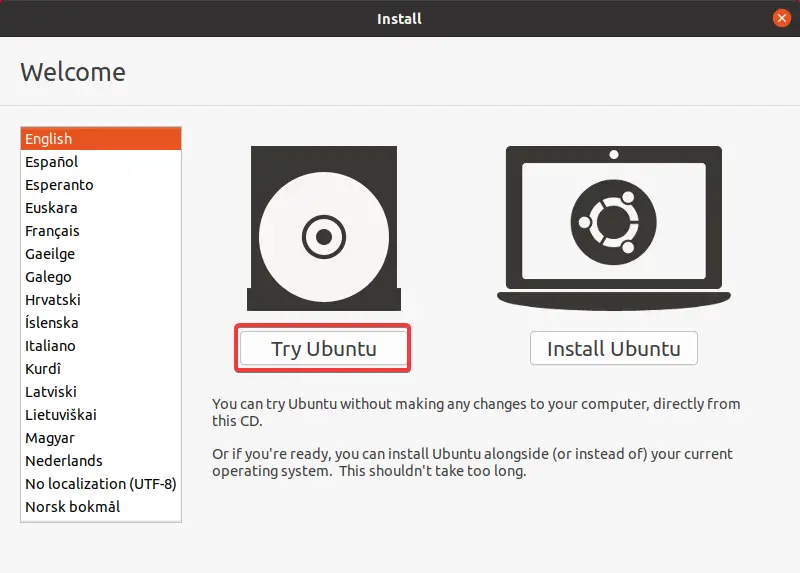
Choose Try Ubuntu without installing

Step 2: Identify Your Linux Partition

Open Terminal and run:

				
					sudo fdisk -l


Find your Linux partition, e.g. /dev/sda2 or /dev/nvme0n1p2.

Step 3: Mount the Partition
				
					sudo mount /dev/sda2 /mnt


Step 4: Mount Essential Directories
				
					sudo mount --bind /dev /mnt/dev
sudo mount --bind /proc /mnt/proc
sudo mount --bind /sys /mnt/sys


Step 5: Chroot into the System
				
					sudo chroot /mnt


Step 6: Reinstall GRUB

For BIOS (Legacy):

				
					grub-install /dev/sda


For UEFI systems:

				
					grub-install --target=x86_64-efi --efi-directory=/boot/efi --bootloader-id=ubuntu


Step 7: Update GRUB and Reboot
				
					update-grub
exit
sudo reboot


Your system should now boot perfectly without showing the rescue prompt.

Bonus Tips: Preventing GRUB Errors in the Future

To ensure you don’t face the same issue again:

Avoid switching between UEFI and Legacy modes.

Back up the GRUB configuration:

				
					sudo cp /boot/grub/grub.cfg /boot/grub/grub.cfg.backup


Use reliable tools when managing partitions.

Keep your system updated with:

				
					sudo apt update && sudo apt upgrade


                        GRUB Rescue vs. GRUB Boot Menu: What’s the Difference?

Feature

GRUB Boot Menu

GRUB Rescue Prompt

Purpose

Allows OS selection

Emergency repair console

Appearance

List of OS options

Black screen with command prompt

When It Appears

During normal boot

When bootloader is broken

How to Fix

Select OS

Run manual commands

Transitioning between these modes is automatic based on GRUB’s state. If files are missing or misconfigured, GRUB drops to rescue mode to help you repair manually.

Buy a USB Drive for System Recovery

You can use a bootable USB to easily recover your Linux or Windows system anytime. Make sure to keep one handy — it can save you hours of troubleshooting.

 Final Thoughts: Fixing GRUB Rescue Prompt Made Easy

Encountering the GRUB rescue prompt might look intimidating, but as you’ve seen, fixing it is simple once you understand the steps. Whether the issue comes from BIOS settings, disk corruption, or missing partitions, you can restore your system within minutes.

Remember — keeping backups, maintaining your partitions, and avoiding random boot mode changes will ensure you never face the problem again.

Anjali Sharma

AUTHOR

Anjali Sharma

(Tech Writer – Tech New Skills)

With several years of expertise in troubleshooting and technical writing, Anjali specializes in creating simple, step-by-step guides for Windows, Linux, macOS, and Cloud technologies. Her focus is on helping users resolve system and platform issues efficiently with clear and practical solutions.

0 0 votes
Article Rating
Subscribe
Notify of
guest
32 Comments
Oldest
Newest Most Voted
Inline Feedbacks
View all comments
binance
binance
4 months ago

Thank you for your sharing. I am worried that I lack creative ideas. It is your article that makes me full of hope. Thank you. But, I have a question, can you help me?

откриване на профил в binance
4 months ago

Thanks for sharing. I read many of your blog posts, cool, your blog is very good.

binance
binance
3 months ago

Thanks for sharing. I read many of your blog posts, cool, your blog is very good.

referencia de Binance
3 months ago

Your article helped me a lot, is there any more related content? Thanks!

binance referal code
3 months ago

Can you be more specific about the content of your article? After reading it, I still have some doubts. Hope you can help me.

registrovat se na binance
2 months ago

Thank you for your sharing. I am worried that I lack creative ideas. It is your article that makes me full of hope. Thank you. But, I have a question, can you help me?

注册以获取100 USDT
注册以获取100 USDT
2 months ago

Thank you for your sharing. I am worried that I lack creative ideas. It is your article that makes me full of hope. Thank you. But, I have a question, can you help me?

binance h"anvisningskod
2 months ago

I don’t think the title of your article matches the content lol. Just kidding, mainly because I had some doubts after reading the article.

Inscreva-se para obter 100 USDT
2 months ago

Can you be more specific about the content of your article? After reading it, I still have some doubts. Hope you can help me.

binance
binance
1 month ago

Thank you for your sharing. I am worried that I lack creative ideas. It is your article that makes me full of hope. Thank you. But, I have a question, can you help me?

Binance推荐代码
Binance推荐代码
1 month ago

I don’t think the title of your article matches the content lol. Just kidding, mainly because I had some doubts after reading the article.

"oppna binance-konto
1 month ago

I don’t think the title of your article matches the content lol. Just kidding, mainly because I had some doubts after reading the article.

bde777
bde777
1 month ago

BDE777 is another betting site. Okay selection of casino games, but they are alright. I don’t see anything super impressive on this site. If you like betting a bit, then check it out. Otherwise its alright. bde777, you decide I guess!

bbrtcasino
bbrtcasino
1 month ago

Yo, check out bbrtcasino! Heard good things about their slots and bonuses. Might just try my luck there tonight. Let’s see if it’s really as good as they say! bbrtcasino

jwin7app
jwin7app
1 month ago

Thinking about downloading jwin7app. Is it smooth and easy to use? Hate it when these apps lag and crash. Let me know if it’s worth the download! jwin7app

binance konto
binance konto
1 month ago

Can you be more specific about the content of your article? After reading it, I still have some doubts. Hope you can help me.

Бонус за регистрацию в binance
1 month ago

I don’t think the title of your article matches the content lol. Just kidding, mainly because I had some doubts after reading the article.

Binance推荐
Binance推荐
28 days ago

Your point of view caught my eye and was very interesting. Thanks. I have a question for you.

trackback
27 days ago

levitra pills

levitra pills

trackback
26 days ago

finasterid

finasterid

gratis binance-konto
22 days ago

Your point of view caught my eye and was very interesting. Thanks. I have a question for you.

trackback
21 days ago

allopurinol generic

allopurinol generic

trackback
21 days ago

prevacid otc generic

prevacid otc generic

trackback
21 days ago

cap vibramycin

cap vibramycin

注册Binance
注册Binance
17 days ago

Thanks for sharing. I read many of your blog posts, cool, your blog is very good.

Anmelden
Anmelden
16 days ago

Thank you for your sharing. I am worried that I lack creative ideas. It is your article that makes me full of hope. Thank you. But, I have a question, can you help me?

binance signup bonus
15 days ago

Your article helped me a lot, is there any more related content? Thanks!

binance推薦
binance推薦
13 days ago

I don’t think the title of your article matches the content lol. Just kidding, mainly because I had some doubts after reading the article.

注册Binance
注册Binance
9 days ago

I don’t think the title of your article matches the content lol. Just kidding, mainly because I had some doubts after reading the article.

Binance开户
Binance开户
4 days ago

Your point of view caught my eye and was very interesting. Thanks. I have a question for you. https://www.binance.com/register?ref=JW3W4Y3A

Create Personal Account
2 days ago

I don’t think the title of your article matches the content lol. Just kidding, mainly because I had some doubts after reading the article. https://accounts.binance.info/en/register?ref=JHQQKNKN

最佳Binance推荐代码
最佳Binance推荐代码
2 days ago

I don’t think the title of your article matches the content lol. Just kidding, mainly because I had some doubts after reading the article.

Read More
32
0
Would love your thoughts, please comment.x
()
x